In plain English
- Instructions: text you save once in Claude's or ChatGPT's settings, or in a project, that the AI reads at the start of every chat. ChatGPT calls them custom instructions.
- Project: a workspace in Claude or ChatGPT that keeps chats, files and instructions for one piece of work together.
- Artifact: something Claude makes for you that opens beside the chat, such as a document or a small interactive tool, like a form with boxes to tick.
One of my favourite ways of working with AI is to set Claude or ChatGPT a task, or a series of them, before I go and do other jobs around the house. But often when I come back to it, it's waiting on me with a list of questions about details I don't remember discussing. I've spent the last hour on something else, and now it wants answers.
This is to be expected, I guess, when you've been away from it for a while. You aren't focused on that task any more, so you have to go looking and digging for what it was about. That digging uses up the time the AI was supposed to save you.
I've often typed back something close to this: "These are too many questions. I'm a human. I can't deal with this much throughput. You've got to step me through it, either one question at a time, or you give me more context and detail and help me reason through it, rather than expecting me to just go bap, bap, bap, bap, bap and reply."
The AI doesn't know anything about your day apart from what's in front of it. It can't see that you've been in three other projects since lunch, that you have to be somewhere in thirty minutes, or that you've forgotten what the options were. So tell it about your day, for example that you have to leave in thirty minutes, and ask for two or three questions at a time. We don't work at the same speed as the AI does. Telling it how to ask protects your time just as much as it speeds things up.
Human beings aren't built to deal with that much input.
For the questions you do need to answer, tell the AI in advance how to ask them by putting the lines below in your settings, so they apply to every chat.
When you need answers from me, group your questions by topic. Start each group with a line on what it's about and why you're asking. Give me one group at a time, with no more than three questions in it. If you can find an answer yourself, do that first.
In Claude: open Settings, then Your Claude, and paste the lines from the box above into the Instructions box.
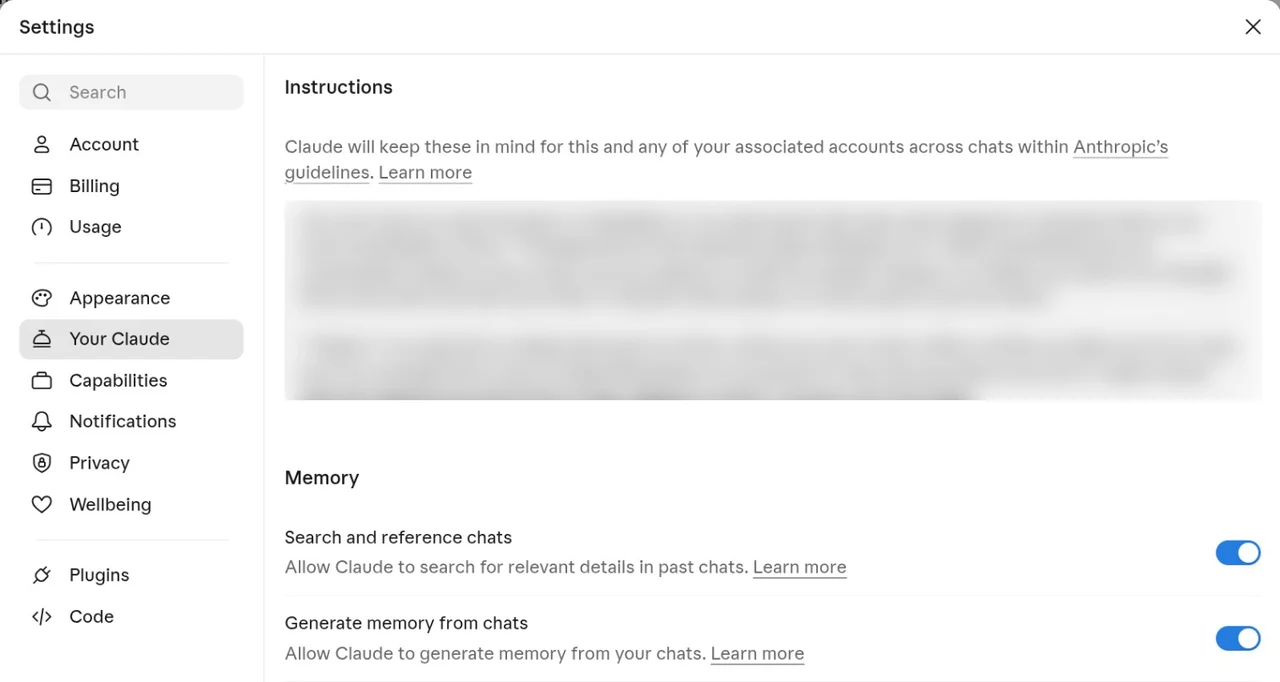
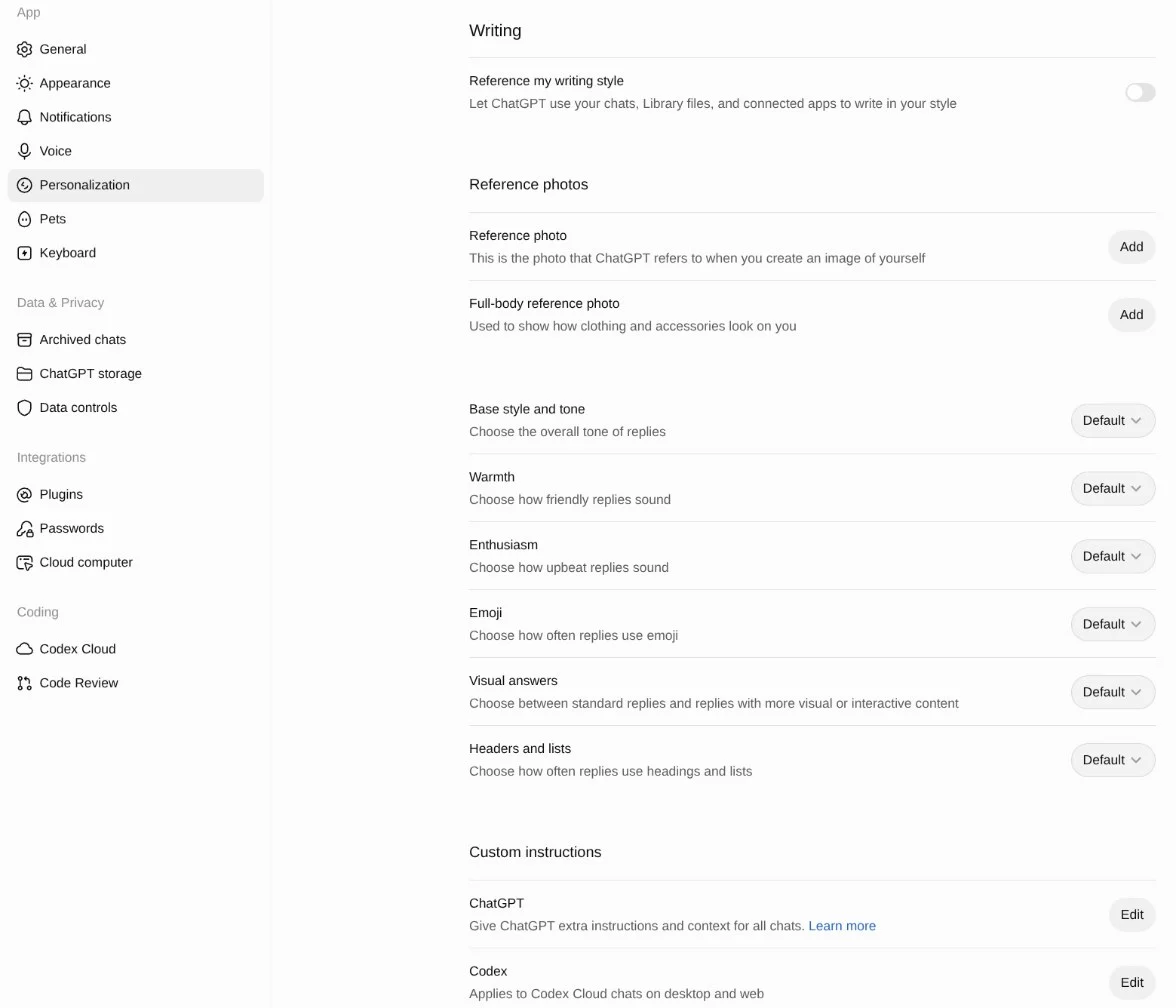
In ChatGPT: open Settings, then Personalization, scroll down to Custom instructions, click Edit next to ChatGPT, and paste the lines in.
Check it works: start a new chat, because the lines only apply to new ones, and ask for help with a job only you know the details of. You should get one group of no more than three questions, with a line on top saying what they're about.
If you only want the lines for one piece of work, make a project for it in Claude or ChatGPT and put the lines in the project's instructions.
When you come back to a chat you've forgotten about, the line at the top of each group tells you which part of the job the questions are about, so you can answer without going back through the whole chat.
The last line comes from what I do when the AI asks something I don't know the answer to: I tell it to go and do some research, find out what best practice is, and then we'll work from there. It might be asking for the sake of asking, when it could have found the answer itself and just hasn't bothered to look yet.
Real replies from Claude Sonnet 5.5 on 13 Nov 2026, each prompt run once. No AI is running on this page.
Pile or paced
Claude got the same request twice, once without the instruction from this post and once with it. Switch between the two replies.
The prompt, both times
I run a small accountancy practice with four staff. I want to start a monthly email newsletter for our clients. Help me set it up. Before you start, ask me whatever you need to know.
Without the instruction 12 numbered questions under 5 headings, all in one reply.
Claude's reply
Here's what I need to know before I set anything up.
Audience and list
- Roughly how many clients will get it? Are they mostly individuals, small businesses, or both?
- Where do their email addresses live now (practice software, a spreadsheet, Outlook/Gmail contacts)? Do clients know they'll be getting a newsletter?
- Would you want to segment, for example sole traders versus limited companies, or VAT-registered versus not?
Content
- What do you want it to do: keep clients informed on deadlines and tax changes, win referrals and upsell services, or both?
- What would a typical issue contain (deadline reminders, a tip, a client FAQ, team news)? Who writes it, and how much time can you spend on it each month?
- What tone do you want: formal and professional, or warm and plain-spoken?
Tools and setup
- Do you already use an email platform such as Mailchimp, Kit, or Outlook? Your budget is also useful, since many tools are free for small lists.
- Do you have a branded sending domain (e.g. you@yourfirm.co.uk), and does someone manage its DNS? We'll need that for deliverability.
- Do you have a logo, brand colours, and a website where sign-ups and past issues could live?
Compliance
- Which country are you in? That decides whether the rules are UK GDPR/PECR, EU GDPR, CAN-SPAM, or something else. Existing clients can often be emailed under "soft opt-in", but I want to be sure.
- Does your regulator or professional body (ICAEW, ACCA, CPA, etc.) have rules on marketing or on the tax advice you include?
Scope
- Do you want me to stop at the setup (platform, template, schedule, content plan, a first issue draft), or also load the list and schedule the send? I won't send anything to clients without your explicit approval.
If you don't know some of these yet, say so and I'll suggest a sensible default.
End of Claude's reply.
With the instruction 3 questions in one group, with a line at the top on what they're about and why Claude is asking.
The instruction Claude had
When you need answers from me, group your questions by topic. Start each group with a line on what it's about and why you're asking. Give me one group at a time, with no more than three questions in it. If you can find an answer yourself, do that first.
Claude's reply
The line on what it's about and why
Let's start with who the newsletter is for and what it should do. That decides the content, the tone and the tool.
- Who will receive it? For example, roughly how many clients, whether they're mostly individuals, small businesses or both, and whether you already have a client email list (and where it's kept).
- What's the main goal? For example, keeping clients informed about deadlines and tax changes, bringing in new work or referrals, or promoting particular services.
- What would you want in a typical issue? For example, deadline reminders, rule changes, practical tips, news about the practice or staff, or a short client success story.
Once you've answered, I'll ask about tools, who writes it, and the compliance and sending details.
End of Claude's reply.
If the questions have already come in
Claude asked 11 numbered questions at once, and this message went back as the reply.
The reply sent back
That's too many questions for me to take in right now. Group your questions by topic. Start each group with a line on what it's about and why you're asking. Give me one group at a time, with no more than three questions in it. If you can find an answer yourself, do that first.
Claude's reply
Group 1 of 4: purpose and audience. This sets the tone, length and content of every issue, so I'm asking it first.
- What do you most want the newsletter to achieve? For example: keep clients informed about deadlines and rule changes, win new work, or cut down on routine client questions.
- Who will receive it, and roughly how many people? Are they mostly business owners, individuals, or a mix?
- Which topics do you expect to cover? Deadlines, tax-law changes and practical tips are common ones, but name whatever fits your clients.
Answer in whatever shape is easiest, and I'll ask the next group once I have these.
Claude's first paragraph, about a tool in the test setup, is left out.
If the questions are already waiting for you, paste this as your reply:
That's too many questions for me to take in right now. Group your questions by topic. Start each group with a line on what it's about and why you're asking. Give me one group at a time, with no more than three questions in it. If you can find an answer yourself, do that first.
You can also ask for the questions as a list where you tick yes or no. In Claude that can be an artifact with yes and no boxes, which you may find easier to get through. When you've filled it in, you copy your answers back into the chat. Members can get the lines from this post in the Members Library, along with the reply above, the steps for adding the lines in Gemini and a prompt that asks Claude for the tick-box list.
Be frank with it. If the options are too much to take in right now, just say so, and tell it to slow the heck down. One reason to hand work to an AI is to get some time back, and I tell people to use that time to take extra breaths.