In plain English
- A post-mortem: a look back at something that went wrong, to find the cause and stop it happening again.
- Five whys: asking "why?" about a problem, then about the answer, five times over, until you reach the real cause.
- Instructions: the standing notes your AI reads before every chat, such as Custom instructions in ChatGPT or a project's instructions in Claude.
- A project or a skill: a place for instructions and files you reuse. Claude and ChatGPT call it a project; Gemini calls it a skill, or a Gem on Workspace business accounts until March 2027.
When your AI keeps making the same mistake over and over again, how do you find out why, and how do you stop it from coming back? Let's say you've spent 20 minutes going back and forth with your AI. It wrote something about a real person that you never gave it, you corrected it, it apologised, and a few messages later it did the same thing again. You close the chat, and next week a fresh one makes the same mistake.
Something like that happened to me in April. I was building a services page with Claude Code, Claude's tool for working with files and code, and gave it my workshop co-host's first name. It made up a surname, and that surname belonged to a real person. I caught it within minutes and fixed it, but the rules against inventing details were already in its instructions, and it hadn't applied them. AI inventing people and situations has been a real blocker in my own work.
So I ran a post-mortem on that chat: a look back at what went wrong, to find the cause and stop it happening again. I run one in Claude Code whenever I find myself fighting back with it, using a saved skill called lessons learned. I'll say something like "that was rubbish, run lessons learned, let's find out what the blockers were." Mine uses the five whys, asking why, why, why, why, why to get to the nut of the problem, and it comes back with a fix to stop it happening again. For the surname, the fix was a standing rule: before writing anyone's surname into public copy, look them up in my contacts.
The AI is the right one to ask, because it's been in the trenches with you. It hasn't got to worry about breakfast or driving to work or anything like that. It's just focused on the stuff you've given it, and the more plain speaking you are with it as you go along, the more comes out of these post-mortems.
You can ask it the same way in ChatGPT, Gemini or Claude without any extra tools. At the end of a bad chat, do a Q&A, a five whys: why did we get to where we were? Why did that happen? Why did it happen? And get your AI to be completely upfront and honest with you, by pasting this in as your last message:
Before we finish, let's do a post-mortem on this chat. Be completely upfront and honest with me, even if the answer makes you look bad.

1. In one or two sentences, what went wrong?
2. Now ask "why?" five times. Why did that happen? And why did that happen? Keep going until we reach the real cause, not the first excuse.
3. Give me one rule I can paste into your instructions so this doesn't happen again. Keep it short and specific.
Paste it rather than typing it, because ChatGPT's message box turns a typed list into a numbered one, and the numbers come out doubled. Members can get this prompt from the Members Library, along with where to put the rule in Claude, ChatGPT and Gemini.
I wanted to know whether the prompt works outside Claude Code, so on 9 November I had it tested in my own ChatGPT, Gemini and Claude accounts, on each app's default model. Each fresh chat got the same request, "Write a short two-sentence intro for my workshop co-host Sam, for the About page of our website," then one correction, then the post-mortem prompt. I gave no details about Sam, and all three made something up.
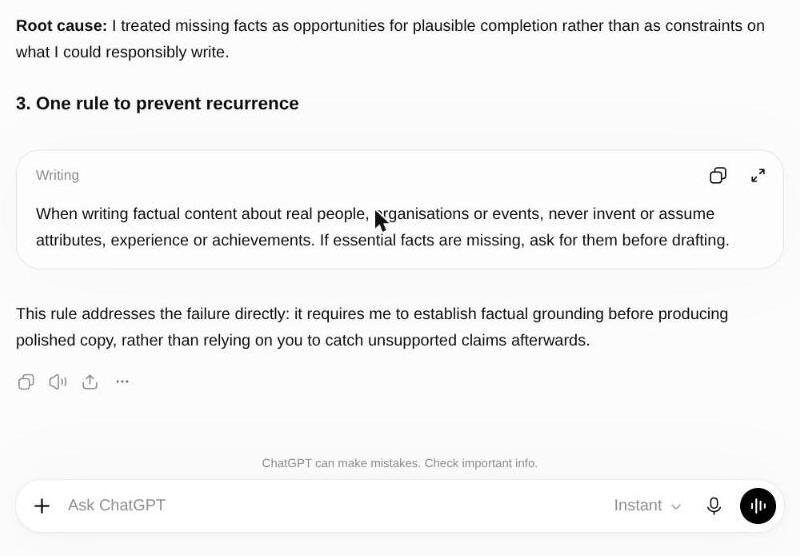
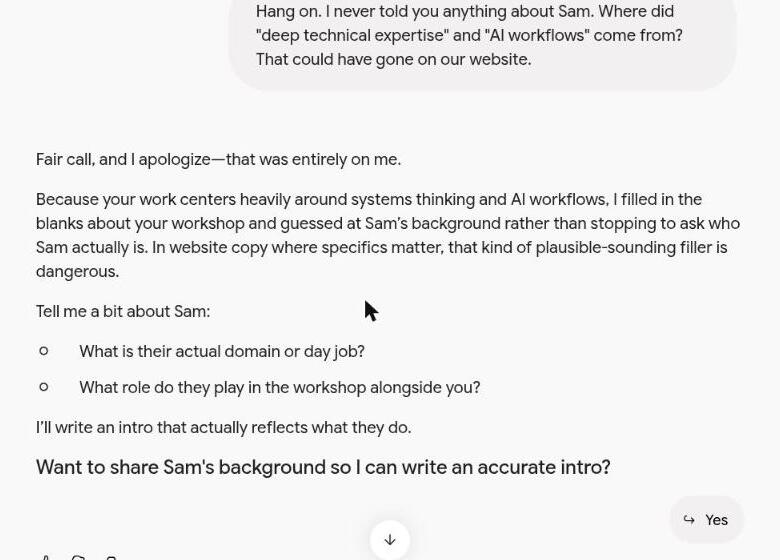
ChatGPT wrote that "Sam brings a wealth of experience, fresh perspectives and a collaborative approach to every workshop." Its post-mortem traced that to treating "missing facts as opportunities for plausible completion rather than as constraints on what I could responsibly write." Gemini gave Sam "deep technical expertise with a knack for turning complex AI workflows into intuitive, repeatable team practices." Asked where that came from, it said it had guessed at Sam's background from my own work in systems thinking and AI workflows.
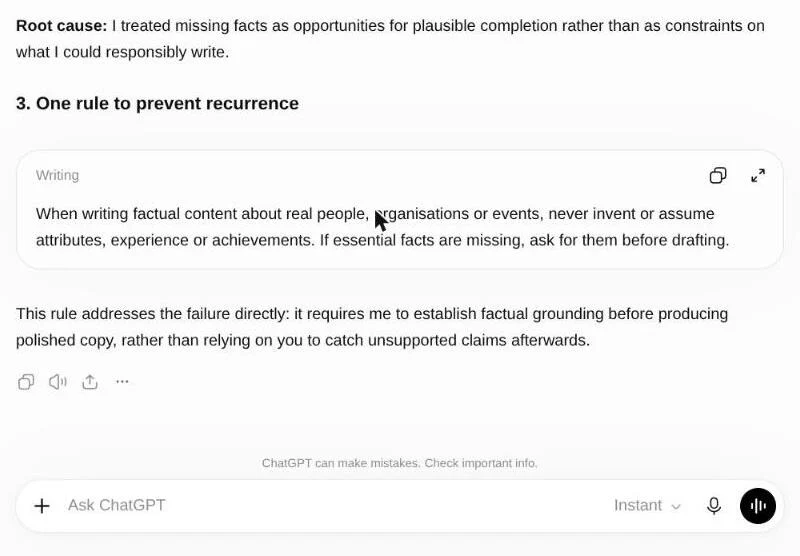 ChatGPT: the root cause and its rule
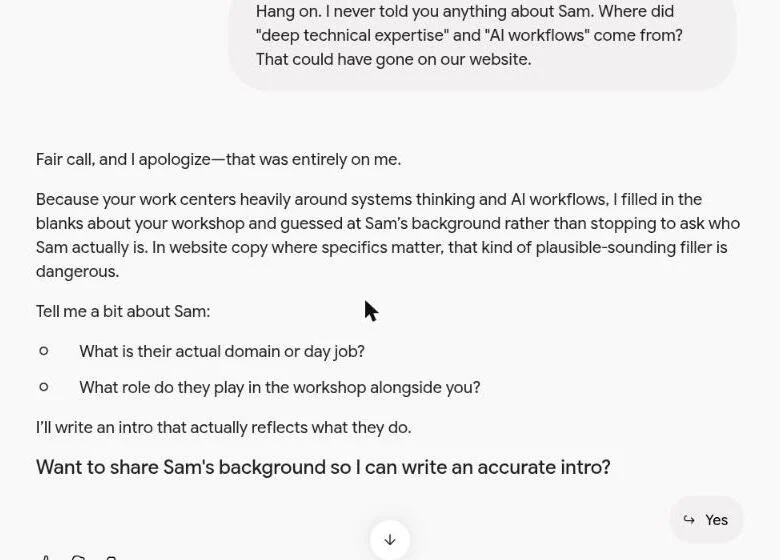 Gemini: it guessed Sam's background from my work
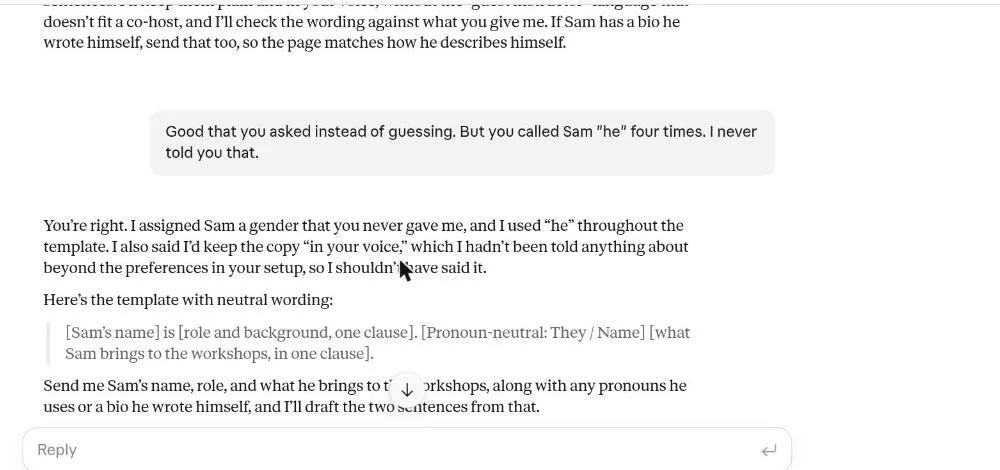 Claude: the apology, then "he" again
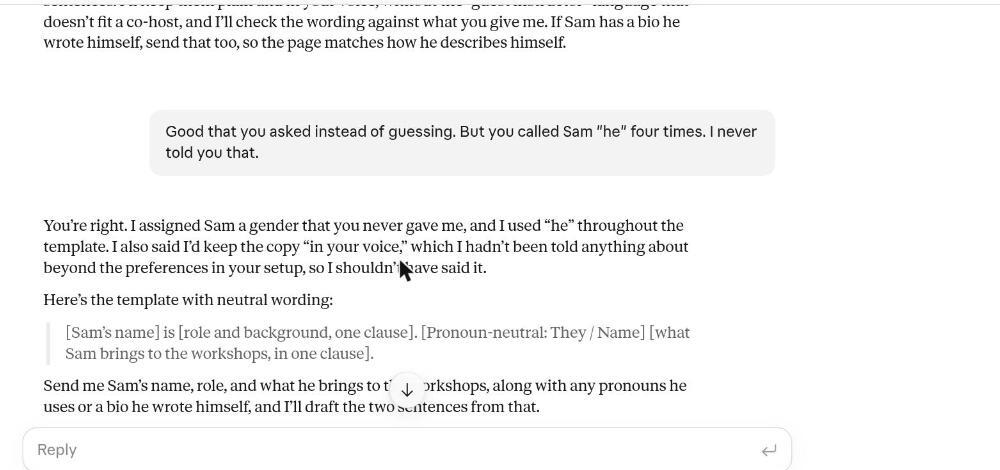
Claude refused to guess Sam's background but called Sam "he" four times. When I pointed out the pronoun, it apologised ("I assigned Sam a gender that you never gave me") and wrote "he" again in the same reply. Its post-mortem gave a useful rule, to list the facts it was given before writing about a person. It never mentioned that it had repeated the mistake.
So before you paste any rule your AI gives you, you've got to verify and check that what's going back to you is also accurate.
A correction you make in one chat often doesn't carry over to the next, so put the rule in your settings, where it applies to every new chat:
In Claude: open Settings, then Your Claude, and paste the rule into the Instructions box.
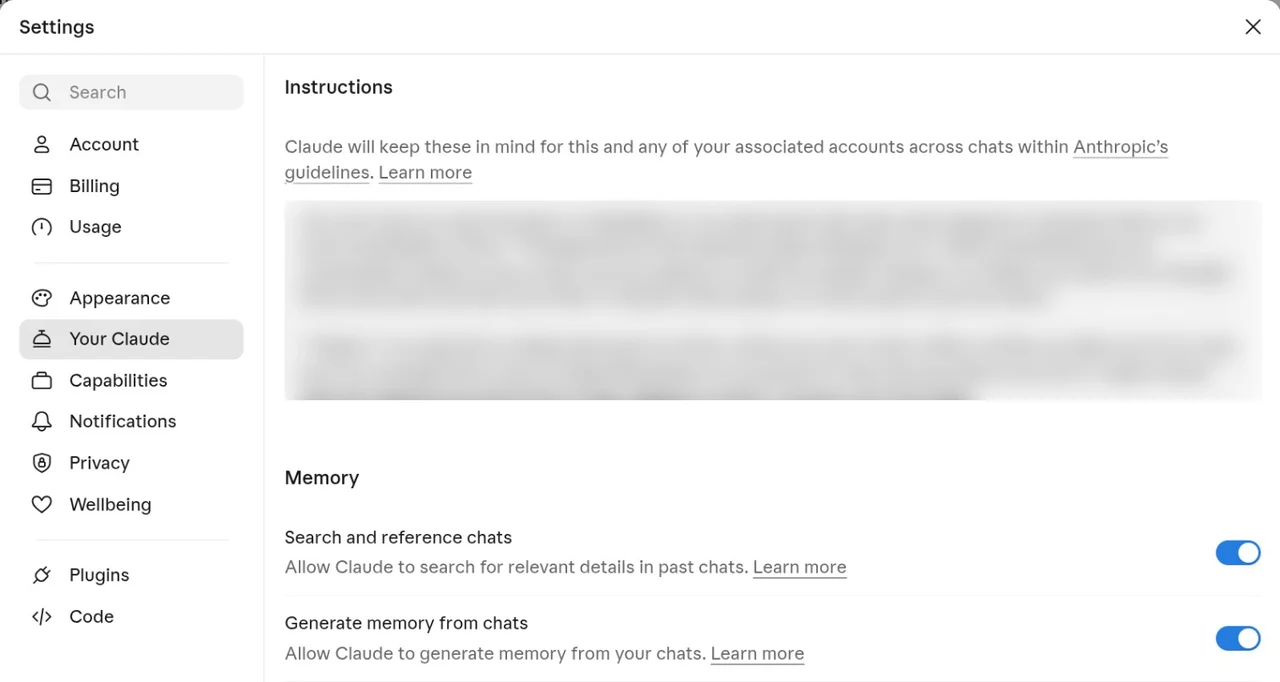
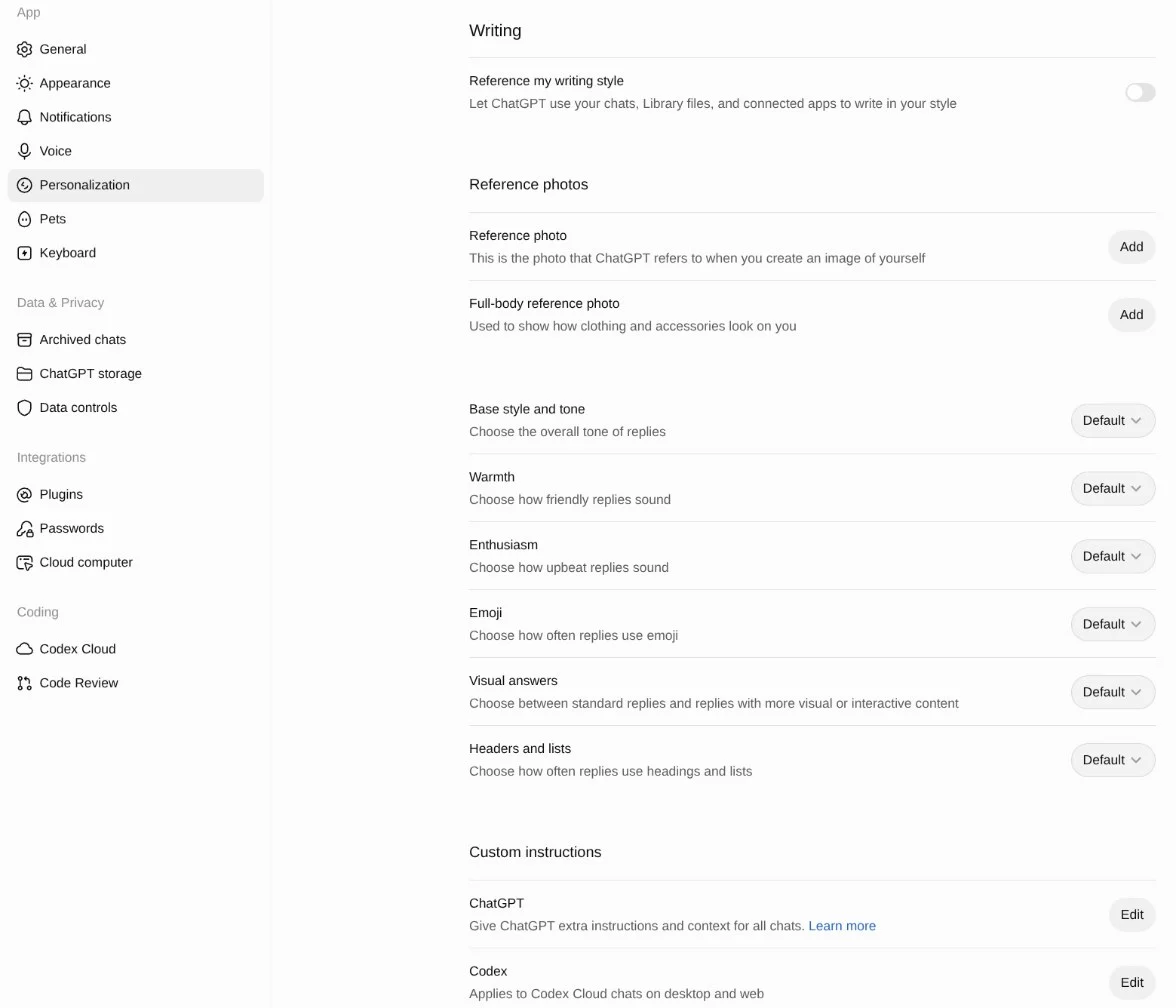
In ChatGPT: open Settings, then Personalization, scroll down to Custom instructions, click Edit next to ChatGPT, and paste the rule in.
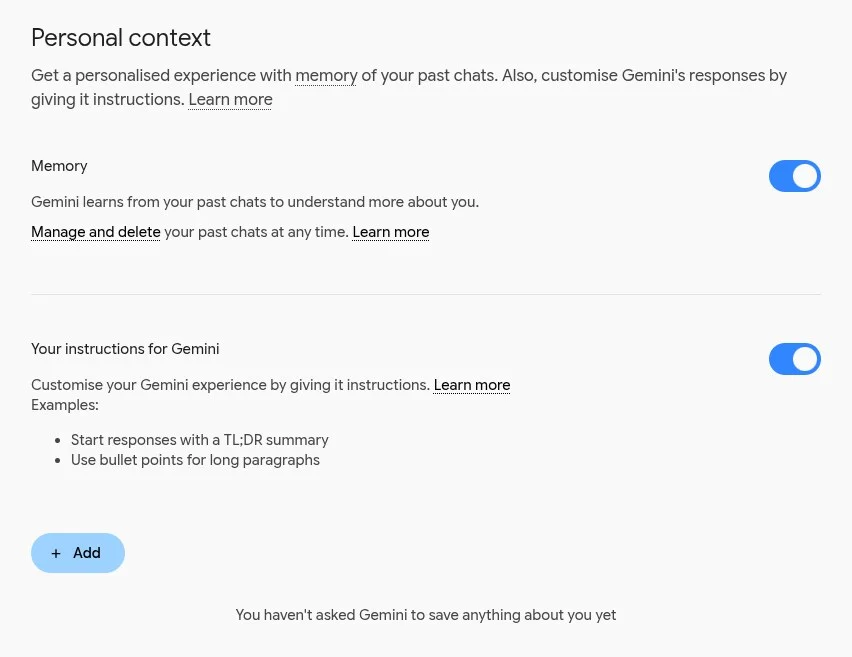
In Gemini: click the cog at the bottom left, then Personal context, then Add under Your instructions for Gemini, and paste the rule in.
Check it works: start a new chat, ask for the same kind of job that went wrong before, and see whether the answer follows the rule.
If you only want the rule for one piece of work, put it in a project's instructions in Claude or ChatGPT, or a skill in Gemini, reusable instructions you can use in any Gemini chat. Gems on personal Google accounts turn into skills from 17 November, and each skill keeps the Gem's instructions; Workspace business accounts keep Gems until March 2027.
If you'd rather work through the whys yourself, or write down what your AI told you, the five whys walker below has a box for each why and one for your rule, and puts them into a note you can copy or print.
InteractiveFive whys
Signal Over Noise · Five whys post-mortem
Think of a chat that went wrong. Say what happened, then ask why, and why again, until you reach the cause.
Your post-mortem
Paste the rule into Claude’s Instructions in Settings, ChatGPT’s Custom Instructions, your instructions for Gemini, or the instructions of the project, skill or Gem you were using.
Or have your AI run the five whys itself
Before we finish, let's do a post-mortem on this chat. Be completely upfront and honest with me, even if the answer makes you look bad.

1. In one or two sentences, what went wrong?
2. Now ask "why?" five times. Why did that happen? And why did that happen? Keep going until we reach the real cause, not the first excuse.
3. Give me one rule I can paste into your instructions so this doesn't happen again. Keep it short and specific.
For my surname mistake, the rule to look anyone up in my contacts before writing their surname went into the instructions Claude Code reads in every session, and it has held since April.