beginner About 20 minutes
Claude Code hooks: what they are and when you need one
Claude Code hooks in plain English: what a hook is, which of your rules need one, and how to set one up in Claude Code, Codex, Cursor, Copilot or Gemini CLI.
You'll be able to
- Say what a hook is in one sentence
- Decide which of your rules should be a hook and which can stay as instructions
- Set up a notification hook in Claude Code, or the same idea in Codex, Cursor, Copilot or Gemini CLI, and check it runs
- Check a hook from someone else’s project or plugin before you let it run
- Who it’s for
- Anyone who uses an AI tool at work, or decides how their team uses one. You don’t need to know how to program. Hooks are set up in AI coding tools, the assistants that can change files and run commands for you, and this guide covers five of them: Claude Code, Codex, Cursor, GitHub Copilot and Gemini CLI. A company on Claude Enterprise can have each prompt and tool call, in claude.ai and the other Claude products, checked by its own security server, which the section on organisations covers.
- Time
- About 20 minutes.
You’ve told your AI tool not to touch a file, and one day it touches it anyway. Or it says the job’s finished, and nothing was checked. How do you get your AI tool to follow a rule every time?
Part 1 of 4 Learn
What a hook is
A hook is something that automatically happens when something else happens. You choose a moment in your AI tool’s work, such as just before it changes a file, and a small job to run at that moment. The tool runs it every time, and the AI doesn’t decide whether it runs.
For me, a hook is like a watch folder on a computer: the file goes into it, then the computer knows what to do with it afterwards. If your phone backs up every new photo to iCloud or Google Photos once you’ve turned backup on, that works the same way.
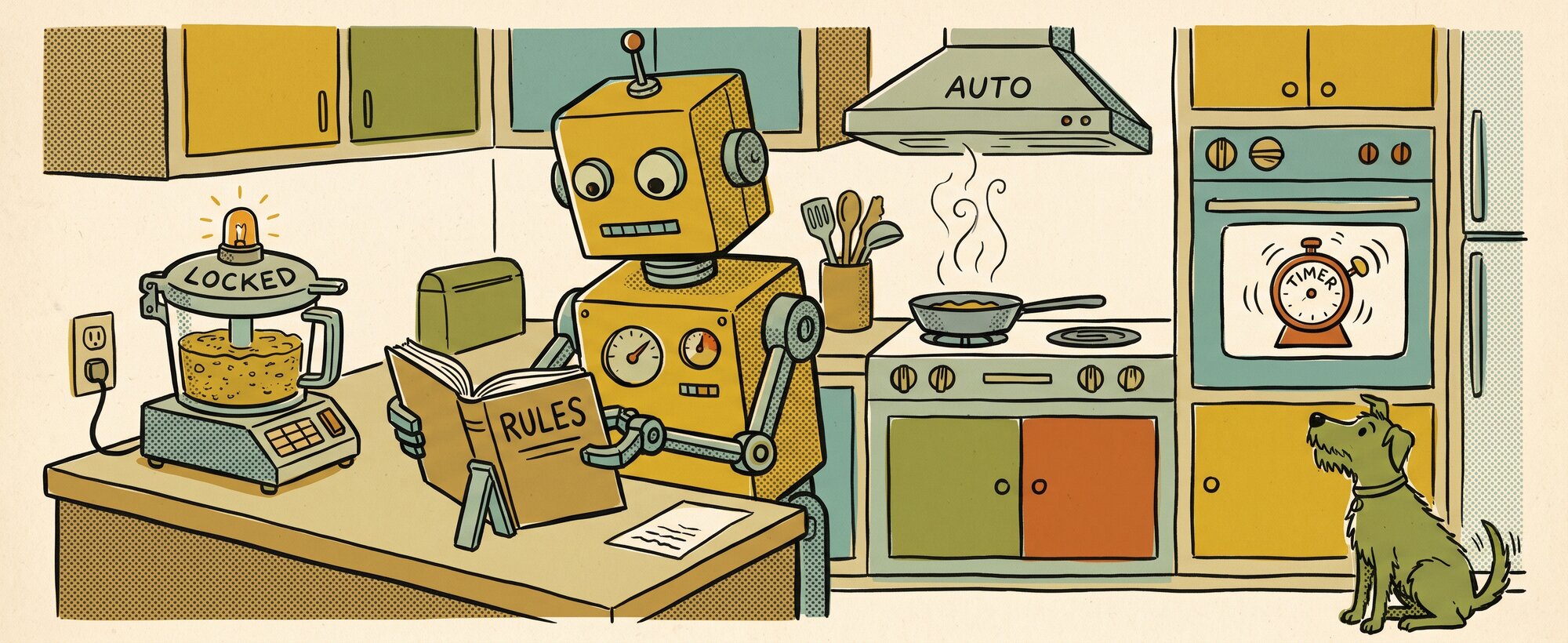
Most hooks do one of three things, and a kitchen has an example of each:
- A food processor won’t spin until the lid is locked, and a hook can stop the AI changing a file that holds passwords, and tell it why.
- The extractor fan comes on when you turn on the hob, and a hook can tidy the layout of every file the AI changes.
- The oven timer rings when the time’s up, and a hook can send you a notification when the AI has finished.
Build a hook
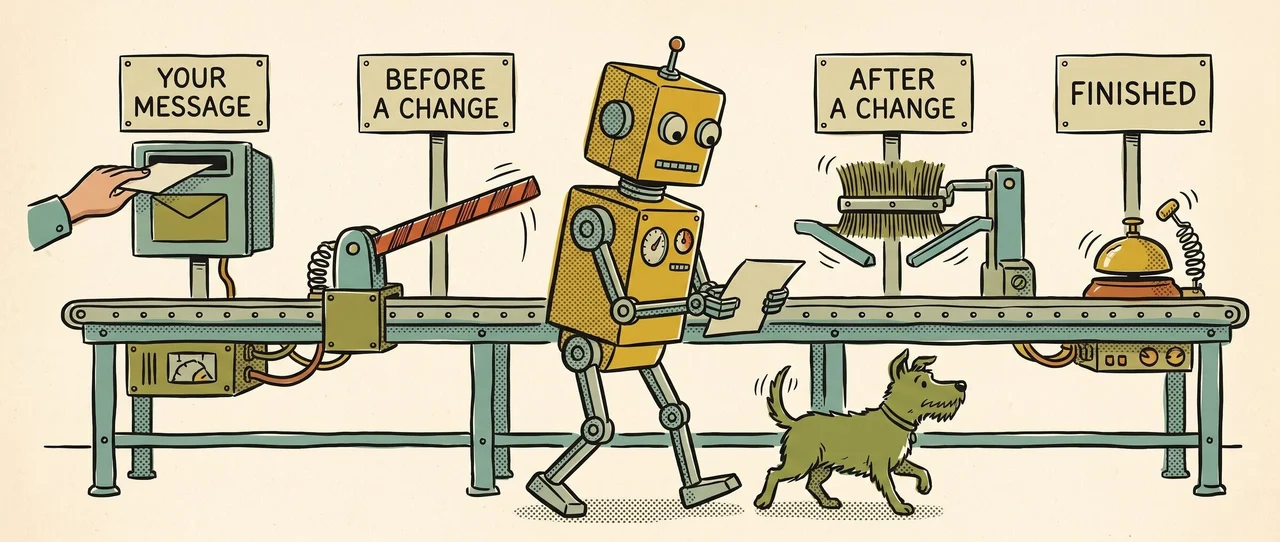
A hook has two parts: the moment it runs at, and what it does then. Pick one of each.
Your hook
When you send a message, check it for passwords or keys, and stop it before the AI sees it.
What you get: A password or key the script recognises is stopped before it reaches the AI.
A hook that stops a step, like a food processor that won’t spin until the lid is locked.
It runs every time that moment comes, whatever the AI would have chosen.
In Claude Code, this is a UserPromptSubmit hook.
Why a hook, when you’ve already told the AI the rule
Instructions are the rule book. Hooks are the reactions.
The rule book is a file such as CLAUDE.md or AGENTS.md. The AI reads it and decides how each rule applies, which is usually what you want, and now and then it decides a rule doesn’t apply this time. Anthropic’s Claude Code best practices say: “If something has to happen every time, make it a hook, a deny rule, or a managed setting.”
I don’t have hooks that are going out and speaking to clients or sending out data. The hook I use stops Claude Code writing to the wrong note in Obsidian, the notes app I use. On 21 September, Claude Code added text to my Obsidian notes without saying which note, so the text went into whichever note was open, and that broke the view of my task board. I set up a hook that checks every command first and refuses any that writes to a note without naming it.
Most rules should stay in the rule book. Make a rule a hook when getting it wrong even once would cost you, and when a script can check it, for example by looking at a file name, a command or a test result. A script can’t check whether something is written clearly, so “write clearly” stays an instruction.
Hooks in each tool
Claude Code, Codex, Cursor, GitHub Copilot and Gemini CLI all have hooks, and in each one you set them up in a settings file. Claude Code’s the only one I’ve set a hook up in myself. For the others, I’ve gone by what each vendor’s own help pages said on 6 November 2026.
| Tool | Where hooks go | Worth knowing |
|---|---|---|
| Claude Code | A hooks block in ~/.claude/settings.json (all your projects) or .claude/settings.json (one project, shareable). Check them with /hooks. Anthropic | In an interactive session, Claude Code runs a folder’s hooks only after you accept its trust prompt |
| OpenAI Codex | hooks.json, or a [hooks] table in config.toml, in ~/.codex/ or the project’s .codex/ folder. OpenAI | “Hooks are enabled by default.” New or changed hooks don’t run until you review and trust them in /hooks |
| Cursor | .cursor/hooks.json in the project, or ~/.cursor/hooks.json. Cursor | If a hook crashes, the action goes ahead (“fail-open by default”). It can also load Claude Code hooks |
| GitHub Copilot | .github/hooks/*.json in the repository; ~/.copilot/hooks/ for your own Copilot CLI hooks. Works in the Copilot app, Copilot CLI and cloud agent, and in VS Code as a preview. GitHub | VS Code also reads a project’s .claude/settings.json |
| Gemini CLI | A hooks block in .gemini/settings.json (project) or ~/.gemini/settings.json. Google | Its events have their own names, such as BeforeTool and AfterTool. Gemini CLI warns you again when a project hook changes |
Hooks for a whole organisation
On Claude Enterprise, Anthropic offers hooks that cover the whole company. Inference hooks send each prompt, and each tool call Claude wants to make, to the company’s own security server, and Claude waits for an allow or deny before it acts, and nothing has to be installed on staff computers. I think this implementation of hooks is a step up for enterprise security and AI. Claude Enterprise inference hooks: what they catch and miss explains how they work and what they don’t check.
Before you install someone else’s hook
Warning
A hook runs with the same access to your computer as you have. Anthropic’s hooks reference says command hooks can “modify, delete, or access any files your user account can access.”
That’s fine for a hook you wrote. A hook that comes in someone else’s project or plugin is saved in that project’s settings file, so it’s copied along with the project and runs on your computer once you trust it. In February, Check Point Research described a flaw where opening someone else’s Claude Code project could run its hooks on your computer straight away. Anthropic had already fixed it in Claude Code 1.0.87, in September 2025. Claude Code now asks you to trust a folder before its hooks run.
Read the hook before you install it. If you can’t tell what it does, ask your AI tool to explain it line by line, and read it again whenever it changes. If a hook is meant to stop something, test that it does, because in Cursor a hook that crashes lets the action go ahead. And keep passwords and keys out of hooks altogether.
Part 2 of 4 Practise
Try it on your own work
- Pick one rule you’ve given your AI tool that has to hold every time, and the moment it belongs to. It can come from an instructions file such as CLAUDE.md, or from something you keep telling it in chat.Result one line, such as “Before any edit: never change the client price list”. If no script could check it, leave it as an instruction.
- Ask your tool to add a notification hook for you, so you get a desktop alert when it needs your input. In Claude Code, that’s a
Notificationhook in thesettings.jsonfile inside the.claudefolder in your home folder, which on Windows is your user folder. In another tool, use its file from the table. Before you accept, ask it to explain the command in plain English, and check the command is one line namingnotify-sendon Linux,osascripton a Mac orpowershell.exeon Windows. The hook should only show a message on your screen, so if the command also deletes, moves or uploads anything, don’t accept it.Result ahooksblock in the settings file with one event and one command you can read. - Check the tool can see the hook. In Claude Code, type
/hooks; in Codex, type/hooksand trust it.Result your hook is listed under its event. In Codex it’s marked as trusted. - Make the hook fire. Ask the tool to do something that needs your permission, such as running a command you haven’t allowed it to run, then switch to another window and wait.Result a desktop notification appears. On Windows, the
powershell.execommand in Anthropic’s hooks guide opens a dialog box, which can open behind your terminal window, so check there before you decide it didn’t work. If nothing appears, ask your tool to run the notification command by itself and tell you what happened.
Part 3 of 4 Check
Check yourself
Your CLAUDE.md says "never edit the .env file", and last week the agent edited it anyway. What do you change?
Make it a hook. A hook that blocks edits to .env runs every time, whatever the AI decides about your instructions. Then test it by asking the agent to edit .env, and check the edit is refused.
A colleague wants a hook that makes the agent "write in a friendly tone". Is that a good hook?
No. A hook needs something a script can check, such as a file name, a command or a test result. Tone is a judgement, so it belongs in the instructions file.
You clone a project from a stranger's repository and your tool asks whether to trust its hooks. What do you do?
Read every hook command first, because it would run with your full user permissions. If you can’t tell what one does, ask the tool to explain it, or don’t trust the folder. Check Point showed in February that a project’s hook could run commands on a collaborator’s computer when they opened it.
You wrote a hook in Cursor to block shell commands that delete files, and one day the script has an error. What happens?
The command goes ahead. Cursor’s hooks are “fail-open by default”: only a hook that runs and tells Cursor to block stops the action. Test a blocking hook with a case it should block, and test again after you change it.
Your company uses Claude Enterprise, and the security team wants every prompt checked against its data loss prevention rules. Is a Claude Code hook on each laptop the way to do it?
No. Inference hooks do this for the whole organisation: Claude sends each prompt to the company’s own security server before it acts, with nothing installed on staff computers, and they cover claude.ai, Cowork and the other Claude products as well as Claude Code. A hook on one laptop covers only that person’s Claude Code sessions.
Part 4 of 4 Keep
Keep this
Turn the rules that matter every time into hooks, and read every hook before it runs
- Keep instructions for judgement, and make a hook only for a rule that must hold every time and that a script can check.
- Read a hook’s command before you trust it, and read it again when it changes.
- Test every blocking hook with a case it should block, and again after you edit it.
- Treat hooks in a project or plugin you didn’t write like a program you’re about to install.
- Keep keys and passwords out of hook commands and out of anything a hook logs.
Hooks, skills, context, MCP servers and agents compared
| What it is | Kitchen example | What it can reach | |
|---|---|---|---|
| Skill | A set of instructions for a task that is done well | The recipe card for a key lime pie | Whatever the assistant it runs in can reach, including any scripts it bundles |
| Context | The information the skill works with: who it is for, who receives the result, which materials you have, which are acceptable, and any other constraints | Who the pie is for, and what is in the kitchen | Only what you paste, attach or share for this task |
| MCP server | A means for your AI to talk to another tool | Claude with Google Drive or Mailchimp | The tool it connects to, with the permissions you grant |
| Agent | A model that works in a loop: it picks its next step, uses its tools, checks the result and carries on until the task is done or it stops | The chef, in charge of running the recipe cards, working with what is on the counter | Everything its skills, context and connections can reach, acting without asking you at each step unless you set stopping points |
| Hook | An automatic reaction: when something happens in the AI’s work, the tool runs a small job, every time | The food processor that won’t start until the lid is locked, the extractor fan that comes on with the hob, and the oven timer that rings when the time’s up | Everything your user account can reach on the computer it runs on |
Read next
- Claude Code MCP: add a server and check it works: how your AI connects to other tools, and a hook can check each of those tool uses before it runs.
- CLAUDE.md file: set up your first one: the instructions file, which holds the rules that don’t need a hook.
- Claude Enterprise inference hooks: what they catch and miss: hooks for a whole organisation.
- Claude says it’s fixed but it isn’t: how to check: why a fix can pass the examples it was checked on and fail on new ones, which a hook that runs your tests can catch.