In plain English
Logo.dev is a service that returns a company's official logo and brand colours when you give it the company's web address. Its MCP server is a connector that lets an AI assistant such as Claude fetch those for you while it works. Look companies up by web address, because looking them up by name can return a different company with the same name.
Logo.dev returns a company's logo from its web address. Give it stripe.com and you get Stripe's mark. It also accepts a stock ticker, an ISIN, a crypto symbol or a company name, and its API returns a full brand profile: description, social links, brand colours and a wide-format brandmark alongside the square logo. I've used it for logo strips on websites and for slides, and it saves the usual search through press pages and icon libraries.
The image CDN serves a logo straight from a URL, https://img.logo.dev/stripe.com?token=YOUR_KEY, using a publishable key that is safe to put in page code. Query parameters set the size (up to 800px), format (PNG, WebP or JPG), light or dark theme, greyscale and retina. Logo.dev says that when a company refreshes its logo, the same URL serves the new one, so there are no files to download or keep updated. The API at api.logo.dev/v2 returns the brand data as JSON and needs a secret key kept on a server. The MCP server exposes that API to Claude, Cursor, Codex and VS Code as 14 tools.
Connecting it to Claude Code takes one command:
claude mcp add --transport http logo-dev https://mcp.logo.dev/mcpThen run /mcp, choose logo-dev and sign in through the browser. There is no API key to copy.
The free Community plan covers 500,000 CDN images a month and $5 of API credit. A logo lookup costs 2¢, a full brand record 5¢ and a name search a thousandth of a cent, according to the pricing page. Commercial projects on the free plan have to credit Logo.dev somewhere public.
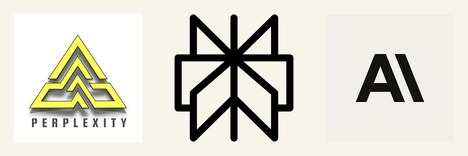
These came straight from the CDN on 13 October: Anthropic, OpenAI, Groq and xAI by domain, Nvidia by the ticker NVDA, then a lookup by the name "perplexity", Groq in greyscale, and a domain that does not exist.

The unknown domain came back as a generated monogram, a plain "T". On a web page the monogram is better than a broken image. In a batch of logos it is easy to mistake for the company's real logo. Add fallback=404 to the URL and a missing logo returns an error instead.
The name lookup returned the wrong company. img.logo.dev/name/perplexity gave a yellow triangle belonging to a different Perplexity, while the domain perplexity.ai gave the right mark. The MCP server's search tool did the same, ranking perplexity1.com above perplexity.ai. Look companies up by domain whenever you know it, and when you don't, have Claude show you the candidates before it picks one.
Through the MCP server, one brand call on anthropic.com returned the company description, LinkedIn, X and YouTube links, three brand colours as hex and OKLCH (#faf9f5, #141413, #6e6d6b), a square logo, an SVG brandmark and two social banners, for 5¢. With that available inside the conversation, Claude can fetch the colours and logos itself while it builds the page or slide:
- "Get Logo.dev's brand colours and brandmark for acme.com and restyle this landing page mockup with them."
- "Make a title slide for my talk at Acme using their brandmark and main colour."
- "Build a logo strip for these 12 tools. Flag any that came back as a generated monogram rather than a real logo."
- "Here are 20 company names. Find each one's domain with Logo.dev search and show me any where the top result might be the wrong company."
- "Add a logo column to this portfolio CSV, looking each company up by ticker."
Logos come in every shape and colour, so a row of them will not match unless you style them. To make a set of logos look uniform, you need to resize and recolour them yourself. For decks, mockups, proposals and logo strips, look companies up by domain and you will rarely need to search for a logo by hand.