



TL;DR
Perplexity now runs a local model on your Mac alongside its cloud models, with an on-device classifier deciding what may leave. The routing is useful and removes work people currently do by hand. The admin rules for what must stay local, and the audit record of what left the device, are Enterprise features — so the smaller firms that adopt this get the classifier without the record. I have not run it: the model was still downloading on my machine and the gate was off, so nothing here is a verdict on how well the classifier performs.
In plain English
Hybrid compute means one task split across two models: a small one on your own Mac, and a large one on Perplexity’s servers. A classifier is a model whose only job is to sort things into categories — here, sensitive or not. Unified memory is the pooled RAM on Apple silicon shared by processor and graphics, and it sets the size of model your Mac can hold. The privacy gate is the classifier plus the rules applied to whatever it flags.
Perplexity’s hybrid compute on Mac splits each task between a local model running on your machine and the frontier models in their cloud. Between them is what Perplexity calls a privacy gate: an on-device classifier that looks for “names, addresses, account numbers, and secrets” before anything leaves, then decides what to do. It can mask the detail, keep the work local, refuse the action, or ask you for consent. Credentials, payment card numbers and government IDs get the strictest handling — Perplexity says the gate can hold those locally, refuse outright, or “rewrite the request so the cloud model can continue without the protected information.”
The classifier runs on your own machine rather than in their cloud.
Perplexity describes the division as such: “The cloud handles frontier reasoning, web search, and planning, while the local model on the Mac processes private files, sensitive information, and on-device actions.” Run frontier in the cloud, run donkey work locally.
I already do this by hand, which means deciding every time which side of the line a task sits on (but to be honest I let Claude harness a lot of it). Perplexity takes that decision away and does it within the product, so nobody has to set the routing up themselves. It takes the pain of routing manually away, and opens the idea up to more people.
The three worked examples in the announcement are all professional services: an investment team running diligence with confidential deal documents staying local, an ad agency comparing web research against unreleased creative, a lawyer researching case law while privileged files are summarised on the Mac.
The privacy claim rests on a classifier being right about what counts as sensitive. Reads more as a liability shield to me. If the classifier gets it wrong, the mistake happened on your machine.
The failure that matters is the false negative — something sensitive the classifier does not flag, which leaves the machine and nobody finds out. The categories named in the announcement are names, addresses, account numbers and secrets. Plenty of sensitive material is none of those things.
Even corporate users struggle to classify P1 and PII correctly, inside organisations that train people to do it. A small model doing it automatically is not going to do better.
Perplexity has built the obvious mitigation:
“For Perplexity Enterprise subscribers, admins can set organization-wide rules for what must stay on the Mac, what may be masked before cloud use, and what requires user approval before going to the cloud. Admins can also audit when information leaves a device.”
Organisation-wide rules, and a record of what left the machine. As an answer to the false negative, an audit log is neither a fix nor the wrong instrument. It is a step in the right direction.
It is also on the top tier. Hybrid compute is available to Pro, Max and Enterprise subscribers. The admin controls and the audit are Enterprise only.
The problem is who ends up on which plan. I can’t see enterprise signing this off any time soon. The firms that will adopt it are smaller — consultancies, agencies, small practices, the professional services in Perplexity’s own examples — and they are on Pro. They get the classifier, no admin rules, and no record of what left the device.
The safeguards and the people who most need them are on different tiers.
The announcement says hybrid compute “works on any Apple silicon Mac running macOS 15+ with at least 24GB of unified memory, which means a broad range of users can use hybrid inference on the Mac they already own.” Inside the app, the model picker describes Gemma 4 E4B, the recommended local model at 6.6GB, as “Best on Macs with 16 GB of memory or more.”
Those are different claims about different things: 24GB is the stated requirement for the feature, and the 16GB line is guidance for that one model. “The Mac you already own” still means 24GB, plus a paid subscription.
The tiering inside the app goes further than the announcement suggests. Of the three launch models, Gemma 4 E4B is the only one a 24GB machine can run. Qwen3.6 35B-A3B at 17.4GB and Perplexity’s own model at 19.0GB both need 32GB, and on a 24GB Mac the app greys them out and says so: “Needs 32 GB RAM — more than this Mac’s 24 GB, so it can’t run here.” On the entry tier you run Gemma, an open-weight model from Google, with Perplexity’s cloud on the other side.
I opened the Local Inference pane and the model was still downloading. The privacy gate toggle was off, and the only explanation was a one-line description: “Checks files and data on this Mac before anything is sent to the cloud, and asks you before sharing anything personal.” I don’t know whether the gate switches itself on once the download finishes, and the interface doesn’t say.
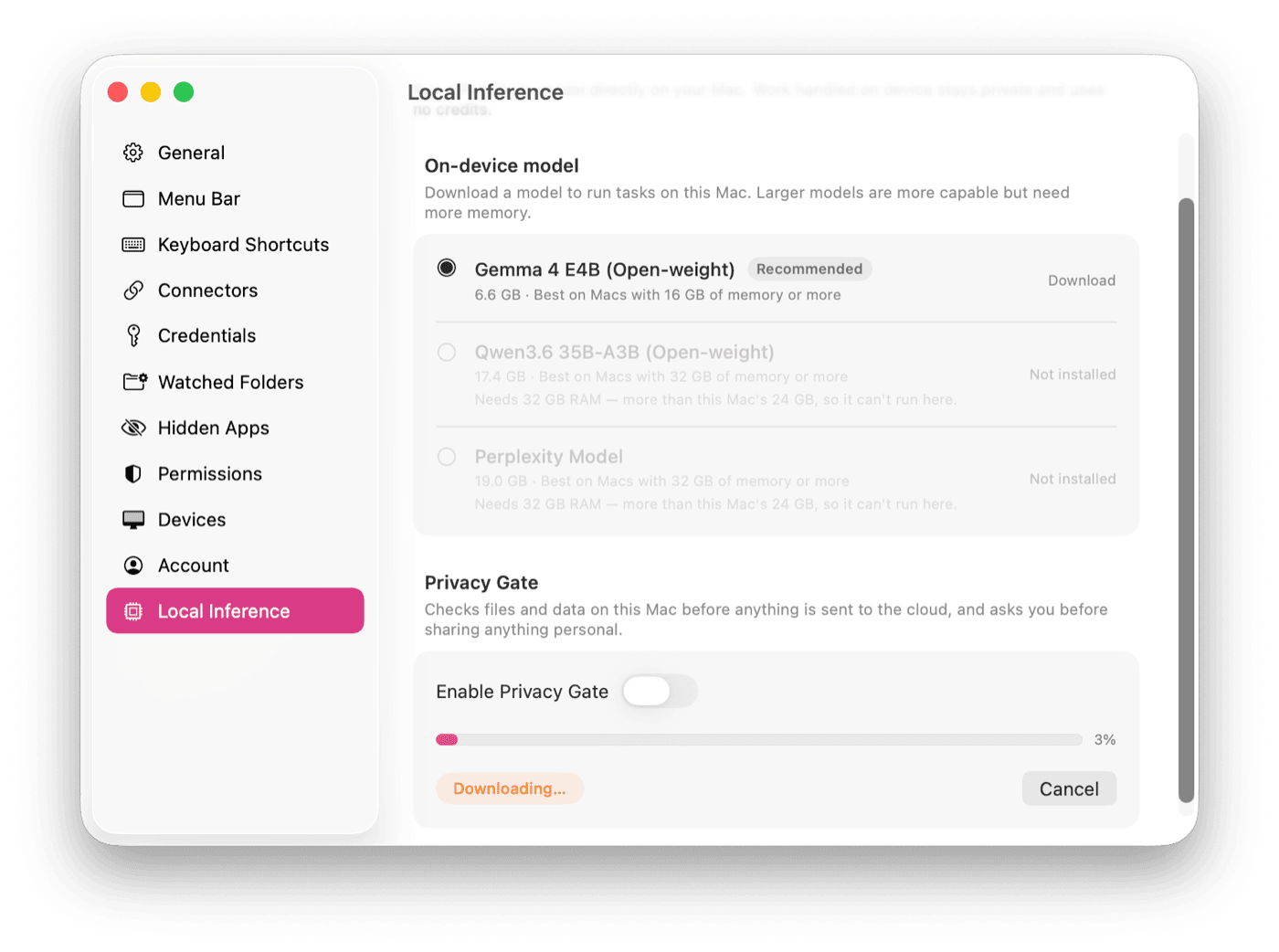
The Local Inference pane on a 24GB Mac: one of the three launch models is available, and the privacy gate is off.
There should be guided use on how that works, from the start. A product that sorts your files into sensitive and not-sensitive needs to explain itself while you are setting it up — what gets masked, what gets refused, what you will be asked about, and what it will not catch. Someone who turns it on without knowing any of that can end up assuming they are covered when they are not.
Splitting the work between local and cloud is a good idea, and building it into the app is the right place for it.
If you are running a small firm on Pro and using this on client work, you have the classifier and not the record. That is the setup most people will be on, and it is the one with the fewest safeguards.